Retro Resurgence - Airstrip Level. (Systems and Level)
Project Type
Third Person Action Adventure
Role
Designer
Location
Burbank, CA
Engine
Unreal Engine 4.27
Other Software Used
Maya, Houdini , Photoshop
A Bit About the game...
Retro Resurgence is an 80s-inspired narrative-driven action game set in the gritty streets of Los Angeles. Players follow William, a battle-hardened Vietnam War veteran, as he navigates a web of danger, betrayal, and redemption. With atmospheric environments, including neon-lit bars, rain-soaked alleys, and jungle flashbacks, the game delivers intense combat and cinematic storytelling reminiscent of classic action films. In this showcase we take a look at one of the chapters from the game.

Featured Level
Gameplay Walkthrough
Level Breakdown.
Role Description

My role in this section of the game began with conceptualizing the initial layout through rough sketches on Procreate on my iPad, which then evolved into designing and modeling the level in Maya. Once I had a playable space, I moved on to scripting gameplay events and systems that would bring the world to life. This included creating Enemy AI behavior and developing Blueprints for scripted sequences, as well as defining key locations for cutscenes to occur seamlessly within gameplay.
In addition to the design work, I also focused on the narrative development of the level. I wrote a screenplay that served as the backbone for the events unfolding throughout the experience, ensuring that every moment aligned with the story’s emotional and thematic goals.
Documentation

Pitch Presentation
Game Design Document


Art Design Document
Keeping the scope and timeline in mind, I wanted the gameplay to feel diverse and evolving, not just a static run-and-gun experience. To achieve that, I designed the level so the player would traverse alone for most of it, letting me focus on enemy encounters, scripted moments, and interactive set pieces. I envisioned a large, multi-phase level split into The Airstrip, The Military Plane, and The Free Fall Sequence, each offering a unique gameplay flavor and keeping the player engaged through changing challenges and pacing.
Designing Level
Designing Playspace

I conceptualized and blocked out the entire map of the playable space in Autodesk Maya, focusing on scale, navigation flow, and player readability before bringing it into Unreal Engine 4 for further development. This approach allowed me to visualize spatial relationships early on and ensure that the level design translated smoothly once implemented in the engine.
One of the aspects I was most excited to include in this level were the set pieces those cinematic, larger-than-life moments that elevate gameplay into something unforgettable. From planes banking left and right mid-air, to enemies being pulled into roaring engines, to an adrenaline-fueled car chase sequence, I wanted every moment to feel alive, dynamic, and unpredictable. These weren’t just visual spectacles they were carefully scripted gameplay moments designed to pull the player into the chaos, making them feel like they were part of a blockbuster action film rather than a static mission. Even though these sequences were challenging to implement, I wanted to push my limits as a designer transforming the level from a static environment into one that evolves and reacts with the gameplay. My goal was to ensure the level had rhythm, energy, and momentum, where every explosion or movement pushed both the story and excitement forward.
Set Pieces

Designing Car Chase

The car-chase sequence at the end of the first part of the level is a mix of animated beats and scripted gameplay moments. As the player drives through specific checkpoints, the game dynamically spawns two to three enemy vehicles. However, I noticed that because the AI was programmed to chase only the player’s position, they always approached from the same direction, which felt predictable and lacked cinematic tension.
To solve this, I created four dynamic target points around the player’s car and had each enemy vehicle randomly chase one of those points instead of the player directly. Their speed would also adjust based on the target point they were pursuing. This not only varied their movement and approach patterns, but also allowed the enemies positioned behind the player to aim and fire during the chase. The result was a far more intense, cinematic, and action-driven chase sequence that feels dynamic every time it plays out.
From my past coding experience, I wanted to expand my technical knowledge and create systems that supported smarter, more dynamic level design. To do this, I implemented Event Dispatchers, which allowed different parts of the level to communicate seamlessly for example, triggering enemy spawns, cutscenes, or environmental changes based on player actions.
I also used Structs to organize gameplay data efficiently and built custom Blueprint Components to reuse functionality across multiple actors. Additionally, I created a Parent–Child Blueprint hierarchy, allowing shared systems like health or perception to live in parent classes while specific behaviors could be customized in child ones.
This modular approach made my code cleaner, faster, and more adaptable, enabling me to design dynamic levels that evolve with gameplay while keeping development efficient and organized.
Efficient Coding

Event Dispatcher

Enemy AI Blueprint Window
AI Enemies
I wanted to include AI enemies as a form of challenge and resistance for the player. My goal wasn’t just to create an engaging level, but also an immersive experience one that reacts dynamically to the player’s actions.
To achieve this, I focused on designing enemy encounters that would push the player to stay alert and adapt their strategy. Each AI enemy was placed with purpose some were positioned to create tension in narrow areas, while others were designed to ambush the player during key story moments. I wanted every encounter to feel deliberate and meaningful, not just as combat challenges but as extensions of the level’s narrative flow and world-building.
Through this, I ensured that the presence of AI enemies not only tested the player’s skill but also deepened their immersion in the world and heightened the emotional stakes of the level.
To add flavor and cinematic depth to this level, I created a series of cutscenes and animated scripted sequences that broke up the routine gameplay loop of simply running and shooting. These sequences introduced variety and pacing to the experience, allowing moments of tension, storytelling, and spectacle to flow naturally within the gameplay.
Each sequence was carefully timed and choreographed to maintain immersion while offering the player a sense of agency allowing them to continue engaging with the world in their own style. This balance between cinematic storytelling and interactive gameplay helped elevate the level’s overall experience, making it feel more dynamic and emotionally driven.
Cutscenes and Animated Sequences

AI Enemies Systems
Systems complementing AI enemies.
Working with AI enemies does not end with just scripting a single actor. When working on a game with detailed gunfight , it was my primary focus that the encounters felt meaningful and coordinated. Initially while programming AI enemies I ran into a problem early on that each and every AI enemy placed in the level acted as a seperate unit and there was no coordination between them. So I developed different systems to keep the encounters co ordinated and detailed.
I created a Combat Manager actor that functioned as a central intelligence system essentially a single mind coordinating multiple Enemy AIs. The main purpose of this system was to make the enemies act as a cohesive, tactical unit rather than a group of individuals acting randomly.
One of its key features was in managing combat behavior: instead of having every Enemy AI rush the player at once, the Combat Manager would dynamically assign roles. For example, it would command one AI to flank the player while directing others to provide suppressive cover fire. This made the encounters feel far more strategic and coordinated, enhancing the sense of realism and challenge.
Another major functionality I programmed was a player detection and pressure system designed to flush the player out of cover. Through repeated playtests, I observed that players tended to stay in one spot during firefights. To counter this, I implemented a check that monitored whether the player remained within a small radius for too long. If they did, the Combat Manager would order the nearest AI to throw a grenade at the player’s location forcing them to reposition and keeping the combat flow dynamic and engaging.
AI Combat Manager
Combat Manager Explaination
Combat Manager Grenade system
Region Managers
Region Manager System
The other system I wanted to implement for my AI enemies was the Region Manager. In certain areas of the level, I wanted enemies to defend specific regions of the map rather than wander off aimlessly. Without this system, the AI would often become scattered, leading to less coordinated and less engaging encounters. By introducing Region Managers, I was able to assign AI units to protect defined zones, ensuring that their behavior aligned with the gameplay intent of that area. This made each combat encounter feel more strategic and grounded, as enemies would now hold their ground, defend their assigned region, and respond intelligently to player movement within their territory.
Before moving on from the topic of AI NPCs, I wanted to discuss the AI enemies and the systems I programmed that, unfortunately, did not make it to the level.
One of these is the Brute Class. I wanted to implement the tanky AI enemy, which poses a threat to the player character up close with their heavy swinging weapons. One of the systems I was able to implement inside the Brute Enemies was the ability to straf around the player character while waiting for their turn to attack. This was implemented with the help of the Environment Query System and Behaviour Tree. The Enemy class awaits orders from the AI Combat Manager and strafes around the player character, in this case, in a smaller circle.
Brute Class
(Enemy AI Class)

Brute Class
(Behaviour Tree)
Losing Line of Sight
Line Of Sight Demonstration
Since the level did not require a stealth section, I was not able to showcase this system in the project. However, based on a boolean parameter, we can turn the setting on or off, allowing the enemy AI to lose sight of the player character or not.
Once the enemy loses the line of sight of Player character they go into the environement sweep state, where they sweep the location they think the player character might be hiding using an Environement Query System, where it generates a field of data points around the enemy character and checks which points are not visible to the enemy character, and based on parameters I set, they go and check if the player character is hiding at that location.
My primary focus while working on a level of this scale was to ensure high performance and consistent framerate. Optimization was a major goal throughout development. This was also one of the key reasons I chose to work in Unreal Engine 4 instead of Unreal Engine 5, as UE4 offers better performance and stability for high-framerate gameplay while still maintaining competitive visuals and functionality.
To achieve smoother performance, I implemented several optimization strategies, including level streaming. I divided the environment into multiple sub-levels that would load and unload dynamically based on the player’s position. For example, when the player jumps down a hill, the previous section of the trek automatically unloads since it’s no longer visible , freeing up valuable memory and processing power.
Another optimization technique I used was hidden loading screens. In one instance, when the player enters the warehouse, the screen fades to black while the next section of the level loads in the background. This seamless transition not only hid loading times but also created a smoother, more cinematic experience , and during playtests, none of the players even noticed it happening.
I applied this same approach to manage memory-heavy assets such as destructible objects, Enemy AIs, and scripted sequences. These assets were loaded or unloaded intelligently depending on the player’s progress, ensuring that the level remained both visually rich and technically optimized throughout gameplay.
Level Optimization:
Loading and Unloading Assets

Unloaded Assets

Loaded Assets
What didn't work well?
Animations
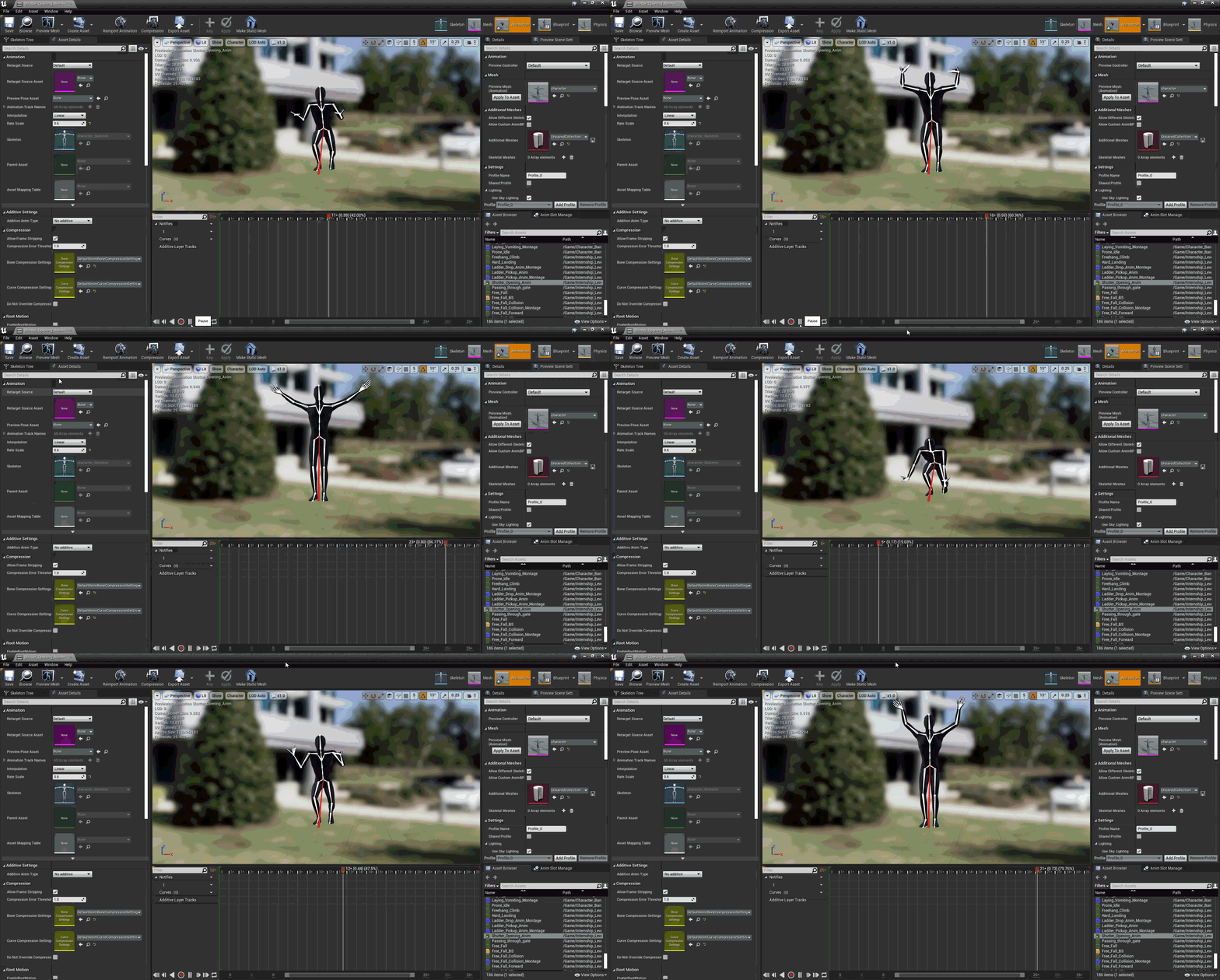
Glitchy Animation
One area where the gameplay experience felt somewhat lacking was in the animation quality and polish. Most of the animations used in this level were sourced from Mixamo, which provided a quick and accessible starting point for prototyping character movement and combat interactions. However, I often ran into technical and visual issues with these animations , such as mismatched poses, awkward blending between transitions, and inconsistencies in root motion that affected the overall fluidity of gameplay.
I have worked with character animations in previous projects, but the complexity of this level made things far more challenging. Coordinating multiple enemy AIs, combat behaviors, and scripted sequences meant that every animation needed to synchronize precisely with gameplay logic and event triggers. Small issues in animation blending or timing could disrupt the pacing of encounters or break immersion entirely.
This experience taught me a lot about the importance of animation integration not just importing and placing them in-engine, but ensuring they work harmoniously with gameplay systems, camera framing, and player responsiveness. It also motivated me to explore creating and refining custom animations in the future to achieve more cinematic and cohesive results for player experience.
By the end of the level, I wanted to create a thrilling finale, a free-fall sequence where the player dives out of a plane to catch the escaping villain. What seemed simple on paper quickly turned into one of the hardest sequences to implement. Because both the player and target shared the same gravitational acceleration, catching the target was impossible without breaking the intended pacing. After multiple iterations and long testing sessions, I built a system that dynamically adjusts gravity based on the player’s input.
During playtests, I also noticed players often zoomed past the target and missed completely. To fix this, I implemented a gravity-scaling system that increases the target’s gravity when it’s above the player and reduces it once it falls below, creating a cinematic yet balanced chase that perfectly wrapped up the level.
Free Fall Sequence
(Physics)

Lack of Sound Effect
Unfortunately, during playtesting, one of the most common pieces of feedback I received was about the lack of sound effects. While the gameplay and visuals were engaging, the absence of impactful audio cues made certain moments feel less immersive than intended. Players noted that actions like gunfire, explosions, and footsteps didn’t carry the weight or atmosphere they expected. This highlighted for me how crucial sound design is in reinforcing player feedback and enhancing the emotional depth of gameplay. It served as an important reminder that audio is just as vital as visuals in creating a truly engaging and responsive experience.
This project was no different from my previous ones when it came to crunching. Balancing multiple projects, coursework, and school assignments meant that I often had to work late into the night, fixing bugs, optimizing blueprints, and testing gameplay sequences to ensure everything functioned smoothly. While it was exhausting at times, the process was deeply rewarding, and it taught me important lessons in time management, prioritization, and staying focused under pressure